

Crawling
10 Proven Ways to Crawling Errors & Boost Website Visibility
1. Introduction: Why Crawling Is the Backbone of SEO
- Crawling is the foundation of every successful SEO strategy. Before your website can rank on search engines, before your content can appear in search results, and before you can gain organic traffic, crawling must happen first. If crawling fails, everything else in SEO automatically fails.
- In simple words, crawling is the process where search engine bots visit your website pages to discover new content, updated pages, and important links. When crawling works properly, search engines can easily understand your website structure. But when crawling is blocked or full of errors, your pages remain invisible—no matter how good your content is.
- Many website owners focus only on keywords, backlinks, and content writing, but they ignore technical crawling issues. This is one of the biggest reasons why websites do not rank. Poor crawling leads to:
Pages not being discovered Content not getting indexed Rankings dropping suddenly Low website visibility
- Crawling errors also waste your crawl budget, which means search engines stop visiting important pages and focus on useless or broken URLs instead. As a result, even high-quality pages fail to appear in search results.
- Another important thing to understand is that crawling is not a one-time process. Search engines crawl your website again and again to check updates, new content, deleted pages, and changes. If your site has crawling problems, bots may reduce crawl frequency, which directly affects indexing speed and rankings.
- In today’s competitive SEO world, optimizing crawling is no longer optional. Websites with clean crawling structures, fewer errors, and fast-loading pages always perform better than sites with poor crawling health.
- That’s why this blog focuses completely on crawling—explaining what crawling is, why crawling errors happen, and most importantly, 10 powerful ways to fix crawling errors and boost visibility. If you want long-term SEO success, improving crawling should be your top priority.
- Remember this golden rule of SEO: No crawling → No indexing → No ranking → No traffic
2. What Is Crawling?
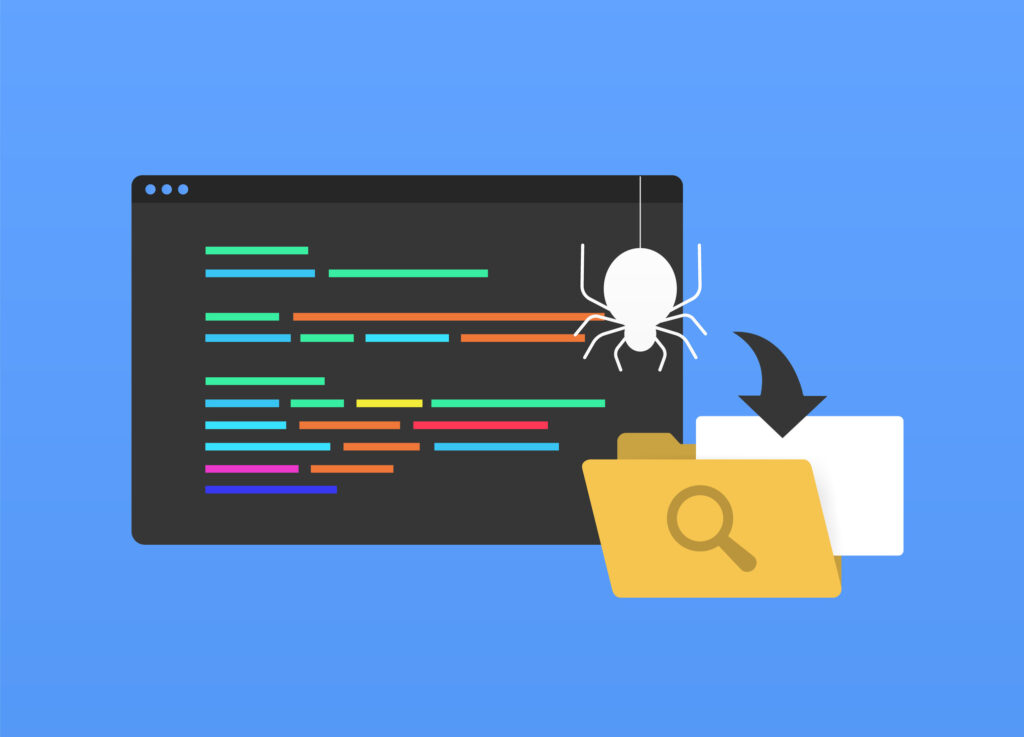
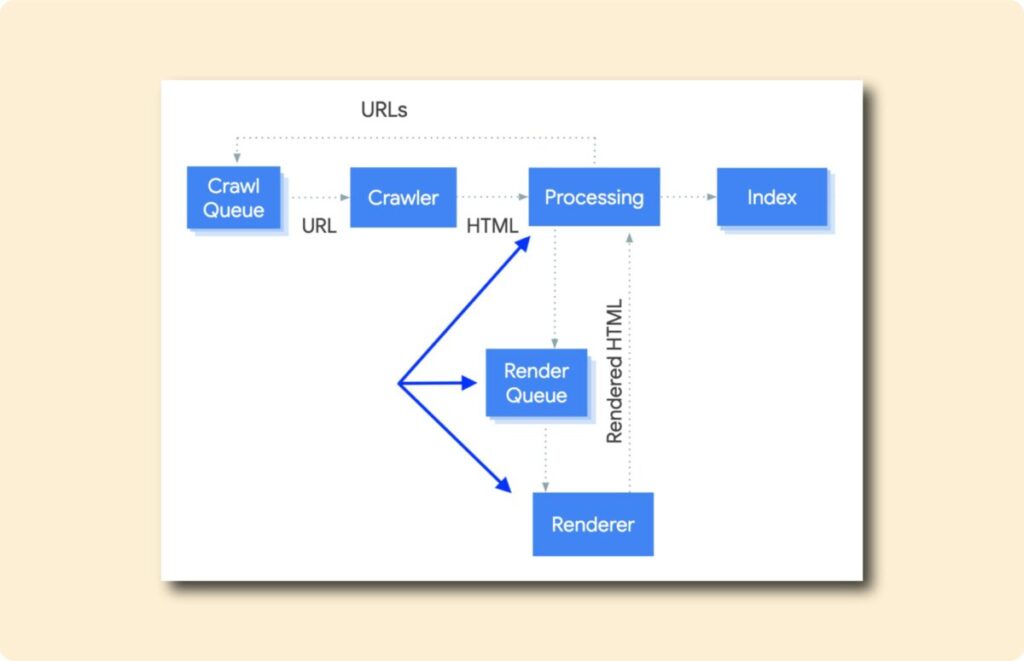
Crawling is the process by which search engines discover your website pages. When you publish a new page or update existing content, search engines send automated bots (also called crawlers or spiders) to visit your website. This entire process is known as crawling.
In very simple language, crawling means search engines reading your website.
When crawling starts, bots follow links from one page to another. They scan text, images, videos, headings, URLs, and internal links. Through crawling, search engines understand:
What your page is about How pages are connected Which pages are important Which pages should be indexed
Without crawling, search engines cannot see your website. If a page is not crawled, it will never be indexed. And if it is not indexed, it will never rank. This is why crawling is the first and most important step of SEO.
How Crawling Works Step by Step A search engine bot visits your website Crawling starts from the homepage or sitemap The bot follows internal and external links Each page is scanned during crawling Crawled pages are sent for indexing
If crawling is smooth, pages move quickly to indexing. If crawling faces problems, pages get ignored or delayed.
Why Crawling Is So Important for SEO
Crawling decides how much of your website search engines can see. Good crawling means:
Faster discovery of new content Better indexing of important pages Higher chances of ranking Improved website visibility
Poor crawling means:
Pages remain hidden Updates are not noticed Rankings drop Organic traffic decreases
That’s why SEO experts always say fix crawling first before anything else.
Crawling vs Indexing
Many beginners confuse crawling and indexing, but they are different.
Crawling = Discovering and reading pages Indexing = Storing pages in search engine database
Crawling comes first, indexing comes second. If crawling fails, indexing will never happen.
What Affects Crawling on a Website
Several factors impact crawling, such as:
Website speed Internal linking structure Broken links Robots.txt rules Server performance Duplicate URLs
When these factors are optimized, crawling becomes faster and more effective.
Final Note on Crawling
Crawling is not just a technical term—it is the entry gate of search engine visibility. Every website, whether small or large, depends on proper crawling to succeed in SEO. If you understand crawling clearly and fix crawling issues early, your website will always stay one step ahead in search rankings.
3. Why Crawling Errors Hurt Website Visibility
Crawling errors are one of the biggest hidden reasons behind poor website visibility. Many website owners keep publishing content but still fail to rank because crawling errors block search engines from accessing their pages properly. When crawling is interrupted, search engines cannot understand, index, or rank your website correctly.
Simply put, crawling errors create barriers between your website and search engines.
How Crawling Errors Affect Search Engines
When a search engine bot visits your website, it expects smooth crawling. But if it encounters repeated crawling errors, several negative things happen:
Bots stop crawling important pages Crawl frequency decreases Crawl budget gets wasted Indexing is delayed or skipped Over time, these crawling issues reduce your website’s trust and visibility.
Crawling Errors = Lost Visibility
Every crawling error sends a negative signal. If too many pages return errors, search engines may assume that your website is poorly maintained. This directly impacts:
Search rankings Organic impressions Click-through rate Overall website authority Even high-quality content cannot rank if crawling errors prevent bots from reaching it.
Crawl Budget Wastage Due to Crawling Errors
Search engines assign a limited crawl budget to each website. Crawling errors waste this budget by forcing bots to:
Revisit broken URLs Get stuck in redirect loops Crawl duplicate pages Face server timeouts As a result, important pages remain uncrawled while useless URLs consume the crawl budget.
User Experience & Crawling Errors Connection
Crawling errors often reflect poor user experience. Pages that return errors for users usually return errors for bots as well. Common examples include:
404 pages Slow loading pages Broken internal links
When crawling errors affect users, search engines reduce visibility to protect search quality.
Mobile-First Indexing & Crawling Errors
Search engines now use mobile-first crawling. If your mobile site has crawling errors:
Pages may not be indexed correctly Rankings drop on both mobile and desktop Visibility reduces across all devices This makes fixing crawling errors even more important today.
Long-Term SEO Damage from Crawling Errors
Ignoring crawling errors can cause long-term SEO damage:
Pages disappear from search results New content fails to rank Website growth slows down Recovery takes more time The longer crawling issues remain unresolved, the harder it becomes to regain lost visibility.
Why Fixing Crawling Errors Is Mandatory
Fixing crawling errors: Improves search engine access Increases indexing speed Protects crawl budget Boosts organic visibility That’s why crawling health should be monitored regularly and errors should be fixed immediately.
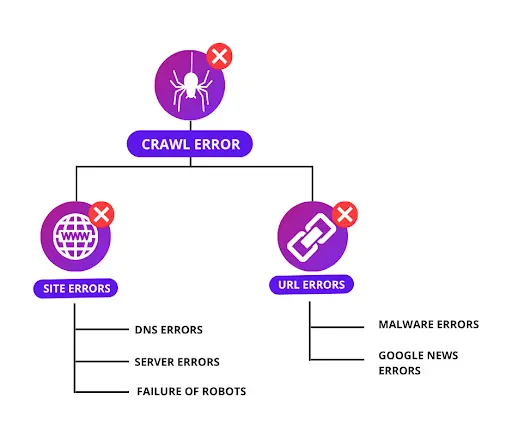
4. Common Types of Crawling Errors
To fix crawling issues effectively, you must first understand the common types of crawling errors. These crawling errors prevent search engine bots from accessing, reading, and understanding your website properly. If these crawling problems are not fixed on time, they can seriously damage your SEO and visibility.
Below are the most common crawling errors every website owner should know.
4.1. 404 Page Not Found Errors
404 errors occur when a page no longer exists or the URL is incorrect. During crawling, bots try to access these pages but fail. Why this crawling error is harmful: Wastes crawl budget Breaks internal linking Blocks crawling of important pages Common causes: Deleted pages Changed URLs without redirects Broken internal or external links
4.2. Server Errors (5xx Crawling Errors)
Server errors happen when the server fails to respond during crawling. Examples: 500 Internal Server Error 502 Bad Gateway 503 Service Unavailable Why this affects crawling: Bots cannot access pages Crawling frequency decreases Search engines lose trust
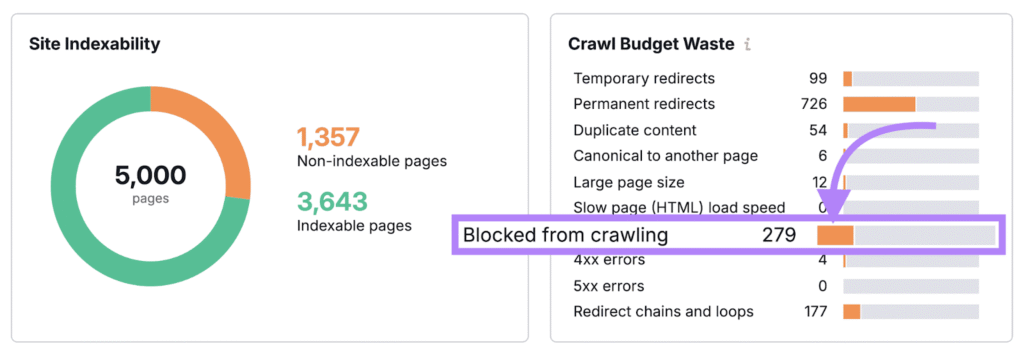
3.1. Blocked by Robots.txt Crawling Errors
Robots.txt tells search engines which pages to crawl and which to block. A wrong rule can stop crawling completely. Common mistakes: Blocking important pages Incorrect disallow commands Blocking CSS or JS files This crawling error can make entire sections invisible.
4.4. Redirect Errors & Loops
Redirect-related crawling errors occur when URLs redirect incorrectly. Types: Redirect chains Infinite redirect loops Wrong 302 redirects These errors confuse bots and slow down crawling.
4.5. Duplicate Content Crawling Issues
Duplicate URLs create confusion during crawling. Examples: HTTP vs HTTPS www vs non-www URL parameters When crawling duplicates, search engines struggle to choose the correct page.
4.6. Soft 404 Crawling Errors
Soft 404 errors occur when a page looks like a valid page but actually shows “not found” content. Why crawling fails here: Bots think content is low quality Pages may not get indexed
4.7. Slow Page Speed Crawling Issues
Slow websites reduce crawling efficiency. Effects on crawling: Fewer pages crawled Delayed indexing Lower rankings Speed optimization is critical for smooth crawling.
4.8. Orphan Pages Crawling Problem
Orphan pages have no internal links pointing to them. Why crawling fails: Bots cannot discover pages Pages remain unindexed Even good content fails without proper crawling paths.
4.9. Mobile Crawling Errors
Mobile-specific issues block crawling on mobile devices. Common issues: Blocked mobile resources Poor mobile usability Slow mobile speed Since mobile-first crawling is standard, these errors reduce visibility fast.
4.10. Sitemap Crawling Errors
An outdated or broken sitemap creates crawling confusion. Issues include: URLs with errors Missing important pages Incorrect format A bad sitemap damages crawling efficiency.
5. 10 Ways to Fix Crawling Errors & Boost Website Visibility
Fixing crawling errors is one of the fastest ways to improve website visibility. When crawling becomes smooth, search engines can easily discover, read, and index your pages. Below are 10 proven crawling fixes explained in a simple and practical way, with proper keyword density for crawling.
Fix #1: Identify Crawling Errors Using Search Engine Tools
The first step to fixing crawling issues is finding them. You cannot improve crawling if you don’t know where the problem is. Use Google Search Console to check: Pages with crawling errors Server-related crawling issues Blocked URLs Indexed vs non-indexed pages Why this matters for crawling: Search engines directly tell you where crawling is failing. Fixing these errors improves crawling speed and visibility.
Fix #2: Optimize Robots.txt for Better Crawling
Robots.txt controls how crawling bots access your site. Crawling problems happen when: Important pages are blocked Entire folders are disallowed CSS or JS files are blocked Crawling fix: Allow crawling for all important pages and block only unnecessary URLs like admin panels.
Fix #3: Fix Broken Links to Improve Crawling Flow
Broken links create dead ends during crawling. How broken links affect crawling: Crawl budget is wasted Bots stop following links Important pages remain uncrawled Best practice: Update broken URLs Use 301 redirects Remove useless links This creates a smooth crawling path across your site.
Fix #4: Improve Website Speed for Faster Crawling
Website speed directly affects crawling frequency. Slow sites cause: Reduced crawling Fewer pages crawled Delayed indexing Speed improvements for better crawling: Compress images Minify CSS & JS Enable caching Fast websites always get better crawling priority.
Fix #5: Submit and Maintain a Clean XML Sitemap
An XML sitemap helps search engines crawl your site efficiently. Good sitemap improves crawling by: Showing important pages Avoiding duplicate URLs Guiding bots correctly Crawling tip: Keep your sitemap updated and free from error pages.
Fix #6: Strengthen Internal Linking for Deep Crawling
Internal links act as roads for crawling bots. Benefits for crawling: Helps bots reach deep pages Improves crawl coverage Prevents orphan pages Use descriptive anchor text and link important pages multiple times.
Fix #7: Handle Duplicate Content to Avoid Crawling Confusion
Duplicate content creates crawling confusion. Crawling issues caused by duplicates: Bots crawl unnecessary URLs Crawl budget is wasted Indexing becomes unclear Crawling fix: Use canonical tags Avoid URL parameters Merge similar content Clear signals improve crawling accuracy.
Fix #8: Correct Redirect Errors for Smooth Crawling
Redirect errors slow down crawling. Common crawling mistakes: Redirect chains Infinite loops Wrong redirect types Best crawling practice: Use 301 redirects Avoid multiple redirects Keep redirect paths short This allows faster and cleaner crawling.
Fix #9: Optimize Mobile Experience for Mobile Crawling
Search engines now use mobile-first crawling. Mobile crawling issues include: Blocked mobile resources Slow mobile speed Poor mobile usability A mobile-friendly website ensures smooth crawling on all devices.
Fix #10: Ensure Strong Hosting & Server Performance
Server stability is critical for crawling. Poor hosting causes: Server timeouts 5xx crawling errors Reduced crawl frequency Choose reliable hosting to maintain uninterrupted crawling. Why These Crawling Fixes Boost Visibility When crawling errors are fixed: Pages get discovered faster Indexing improves Rankings stabilize Organic visibility increases Healthy crawling creates a strong SEO foundation.
6. How Fixing Crawling Improves SEO Visibility
Fixing crawling issues has a direct and powerful impact on SEO visibility. Many websites struggle with low rankings not because of weak content, but because crawling problems prevent search engines from accessing their pages properly. When crawling becomes smooth and error-free, search engines can clearly understand your website, which leads to better indexing and higher visibility.
Crawling Is the Gateway to Visibility
Search engines cannot rank what they cannot crawl. If crawling is blocked or inefficient: Pages remain undiscovered Updates are ignored Indexing is delayed Once crawling issues are fixed, search engines can easily reach every important page. This alone can lead to instant visibility improvements, especially for new or updated content.
Faster Crawling = Faster Indexing
When crawling errors are removed: Bots spend less time on broken URLs Crawl budget is used efficiently Important pages are crawled more often As a result, indexing speed increases. Faster crawling means your content appears in search results sooner, giving you a competitive advantage.
Improved Crawl Budget Utilization
Every website has a limited crawl budget. Crawling errors waste this budget on: Duplicate pages Redirect loops Error URLs By fixing crawling problems, search engines focus their crawl budget on valuable pages. This improves overall website coverage and visibility.
Better Internal Page Discovery Through Crawling
Healthy crawling ensures that: Deep pages are discovered New pages are found quickly Orphan pages are avoided Strong internal linking combined with proper crawling helps search engines understand page importance, which boosts rankings for key pages.
Crawling Fixes Improve Page Authority Flow
When crawling is smooth: Link equity flows properly Important pages receive more authority Ranking signals strengthen Crawling errors break this flow. Fixing them restores SEO power across your website.
Mobile-First Crawling Boosts Overall Rankings
Search engines use mobile-first crawling to evaluate websites. Fixing mobile crawling issues improves: Mobile indexing Desktop rankings Overall search performance A mobile-optimized website always benefits from better crawling and higher visibility.
Enhanced User Experience Supports Crawling Signals
Pages that load fast and work well for users also perform better in crawling. Fixing crawling errors usually improves: Page speed Navigation Site structure Search engines reward such websites with improved visibility.
Long-Term SEO Growth Through Crawling Optimization
Crawling optimization provides long-term benefits: Stable rankings Consistent traffic growth Faster content discovery Unlike short-term SEO tricks, fixing crawling creates a strong, long-lasting foundation.
7. Best Practices to Maintain Healthy Crawling
Fixing crawling errors once is not enough. To keep your website visible and competitive, you must maintain healthy crawling continuously. Search engines crawl your website regularly, and even small technical mistakes can create new crawling issues over time. That’s why following crawling best practices is essential for long-term SEO success.
Below are the most effective best practices to maintain smooth and healthy crawling, explained in a simple and practical way with proper keyword density for crawling.
7.1. Monitor Crawling Health Regularly
Crawling issues can appear anytime due to updates, plugins, or content changes. Best practice for crawling: Check crawling reports weekly Track new crawling errors Fix issues immediately Regular monitoring ensures crawling stays stable.
7.2. Keep Website Structure Simple for Easy Crawling
A clean site structure helps search engine bots crawl efficiently. Good crawling structure includes: Clear navigation Logical categories Shallow page depth Pages should be reachable within 2–3 clicks to support deep crawling.
7.3. Maintain a Clean & Updated XML Sitemap
Your XML sitemap guides crawling bots. Healthy crawling requires: Updated sitemap No broken URLs Only indexable pages Remove error pages from the sitemap to avoid crawling confusion.
7.4. Optimize Internal Linking for Continuous Crawling
Internal links are the paths for crawling bots. Best internal linking practices: Link important pages frequently Avoid broken internal links Use natural anchor text Strong internal linking improves crawling depth and coverage.
7.5. Avoid Duplicate URLs to Protect Crawling Efficiency
Duplicate URLs waste crawling resources. To maintain clean crawling: Use canonical tags Keep one version of each page Control URL parameters Clear signals help search engines crawl the right pages.
7.6. Improve Page Speed for Better Crawling Frequency
Fast websites receive more frequent crawling. Speed improvements help crawling by: Reducing server load Increasing crawl rate Improving indexing speed Page speed optimization keeps crawling smooth.
7.7. Ensure Mobile-Friendly Crawling at All Times
Search engines prioritize mobile crawling. Mobile crawling best practices: Responsive design No blocked mobile resources Fast mobile loading Mobile optimization protects visibility on all devices.
7.8. Keep Robots.txt Rules Updated
Robots.txt controls crawling access. Healthy crawling rules include: Allow important pages Block unnecessary URLs Avoid accidental disallow rules Review robots.txt after every major update.
7.9. Fix Broken Links Quickly to Maintain Crawling Flow
Broken links break crawling paths. Best practice: Run link audits regularly Fix 404 errors Use proper redirects This ensures uninterrupted crawling.
7.10. Use Reliable Hosting for Stable Crawling
Server stability directly impacts crawling. Reliable hosting ensures: Fewer crawling failures Faster server response Consistent crawl activity Strong hosting keeps crawling uninterrupted. Why Healthy Crawling Matters Long-Term Maintaining healthy crawling: Keeps pages indexed Protects rankings Supports traffic growth Improves SEO stability Crawling issues left unattended slowly reduce visibility over time.
8. Final Conclusion: Crawling Is the Foundation of Long-Term SEO Success
Crawling is the starting point of everything in SEO. No matter how strong your content is or how many backlinks you build, if crawling is weak or blocked, your website will struggle to appear in search results. Throughout this guide, we have clearly seen that crawling directly controls visibility, indexing, and rankings.
When crawling works smoothly:
Search engines discover pages faster Important content gets indexed quickly Crawl budget is used efficiently Website visibility improves consistently
On the other hand, crawling errors create invisible barriers that stop growth. Broken links, server issues, blocked pages, duplicate URLs, and slow speed all damage crawling and reduce SEO performance.
The good news is that crawling problems are fixable. By identifying crawling errors early, applying the right technical fixes, and maintaining healthy crawling practices, you can build a strong SEO foundation that supports long-term success.
Remember, crawling is not a one-time task. Search engines crawl your website repeatedly, so continuous monitoring and optimization are essential. Websites that prioritize crawling health always stay ahead of competitors in rankings and organic traffic.
Key Takeaway
No crawling → No indexing → No ranking → No traffic If you focus on improving crawling today, every other SEO effort—content, keywords, and backlinks—will deliver better results tomorrow.
FAQs
Q1. What is crawling in SEO?
Crawling is the process where search engine bots visit and scan website pages to discover content. Without crawling, pages cannot be indexed or ranked.
Q2. Why is crawling important for website visibility?
Crawling allows search engines to find your pages. If crawling fails, your website remains invisible in search results, which reduces traffic and rankings.
Q3. What causes crawling errors on a website?
Common causes of crawling errors include broken links, server issues, blocked pages in robots.txt, duplicate URLs, slow page speed, and redirect problems.
Q4. How do crawling errors affect SEO rankings?
Crawling errors prevent search engines from accessing important pages. This leads to poor indexing, wasted crawl budget, and lower rankings.
Q5. How often should I check crawling errors?
You should monitor crawling errors at least once a week to ensure search engines can crawl your website without interruptions.
Q6. What is crawl budget and why does it matter?
Crawl budget is the number of pages a search engine crawls on your website in a given time. Crawling errors waste this budget and reduce visibility.
Q7. Do 404 errors harm crawling?
Yes, too many 404 errors waste crawl budget and interrupt crawling paths, which can negatively affect indexing and rankings.
Q8. Does website speed affect crawling?
Yes, slow websites reduce crawling frequency. Faster websites allow search engines to crawl more pages efficiently.
Q9. Is mobile optimization important for crawling?
Yes, search engines use mobile-first crawling. If your mobile site has crawling issues, your overall rankings and visibility will suffer.
Q10. Can fixing crawling errors improve traffic?
Yes, fixing crawling errors improves indexing, boosts rankings, and increases organic traffic over time.
Related Articles


Recent Posts

October 12, 2026
Google Ads Qualified Leads

September 26, 2026
Google AI Overviews

September 25, 2026
Leave a comment