
Canonical Issue
Canonical Issue: Easy 5-Step to Fix Duplicate Content
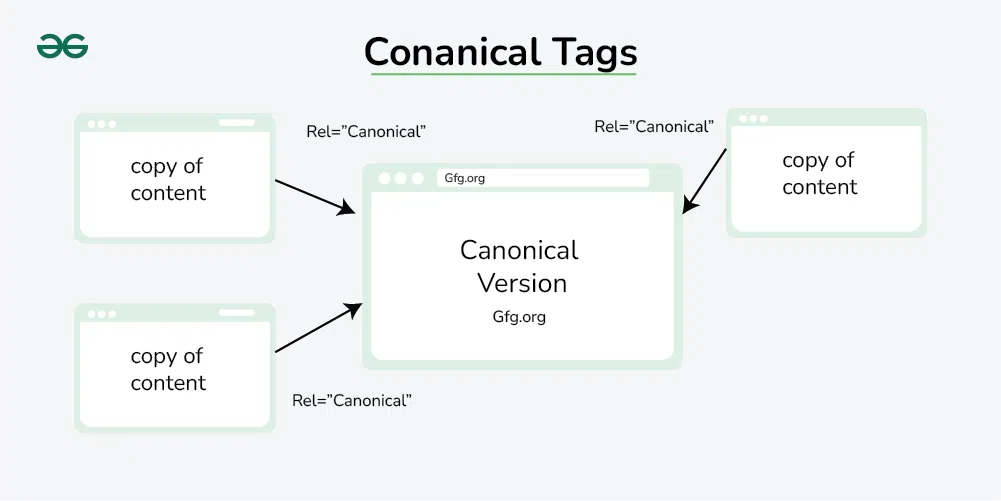
Table Of Content
1. What Is a Canonical Issue?
A canonical issue is important because it confuses Google when the same content appears on different web pages. Google doesn’t know which page to show in search results, so your website might not rank well. Instead of one strong page, you get many weak pages, and your SEO power gets divided. Google focuses on the right page, which helps your site rank higher and get more traffic.
This can make people trust you less and drop your Google rankings. Also, search engines might choose the wrong page to show, which can lead to less traffic and missed customers. Using a canonical tag helps search engines know which page is the main and original one, so your SEO stays strong and clear.
2. Why Canonical Issue Are Bad for SEO
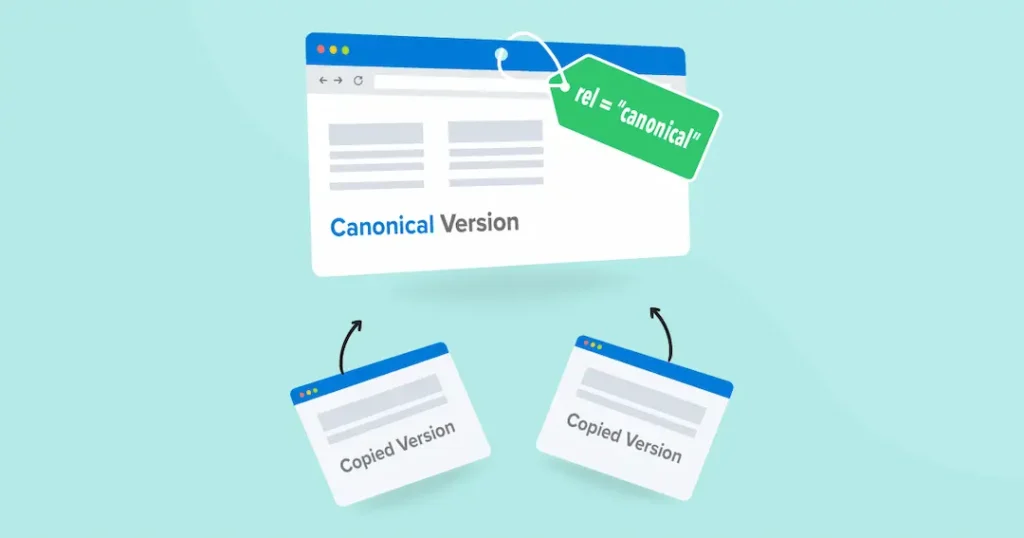
Canonical issue are bad for SEO because they confuse search engines. If the same content is on different URLs, Google gets confused about which one to show in search results. This can cause your website to lose traffic, because Google might skip and lower the ranking of your important pages. your SEO value gets split between multiple pages instead of being focused on one strong page. This makes your website do poorly in Google search results.
If your site has a canonical issue, the same content may appear on many pages, which can confuse Google. Search engines want to show the best and most original content, but if your pages look similar, they might ignore all of them. This means your content won’t show up where it should in search results. Also, page authority and backlinks may get divided between duplicates, making it harder for any one page to rank well on Google.
3. Common Causes of Canonical Issue Problems
Canonical issues usually happen when your website shows the same and very similar content under different URLs. If your site uses URL parameters like filters, tracking codes, and search queries. Other common causes include having both www and non-www versions, and HTTP and HTTPS versions of a page. These issues confuse search engines and can hurt your SEO if not fixed properly.
Sometimes, websites show the same page in different ways, like with and without www, and with extra codes like?re=ad. These different versions can all show the same content, which confuses Google. If the canonical tag is missing or wrong, Google won’t know the main page is the main one. This can make your site harder to find on Google.
4. How to Fix Canonical Issues
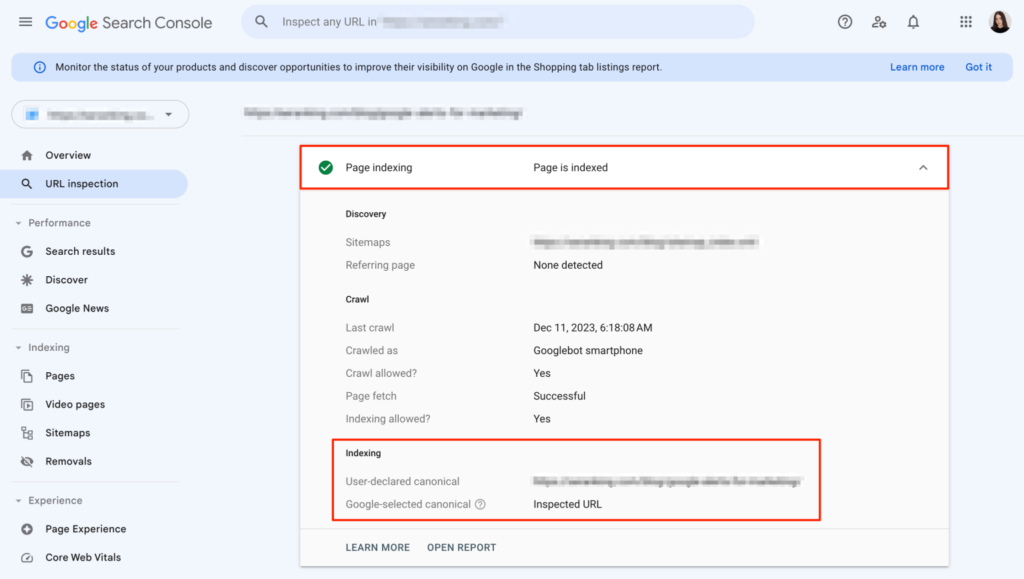
To fix the canonical issues on your website, you first need to find out which pages are showing the same and very similar content. You can use tools like Google Search Console and SEO software to scan your site and see where the problems are. once you find these duplicate pages, the next step is to decide which version is the main one – this is called the canonical page.
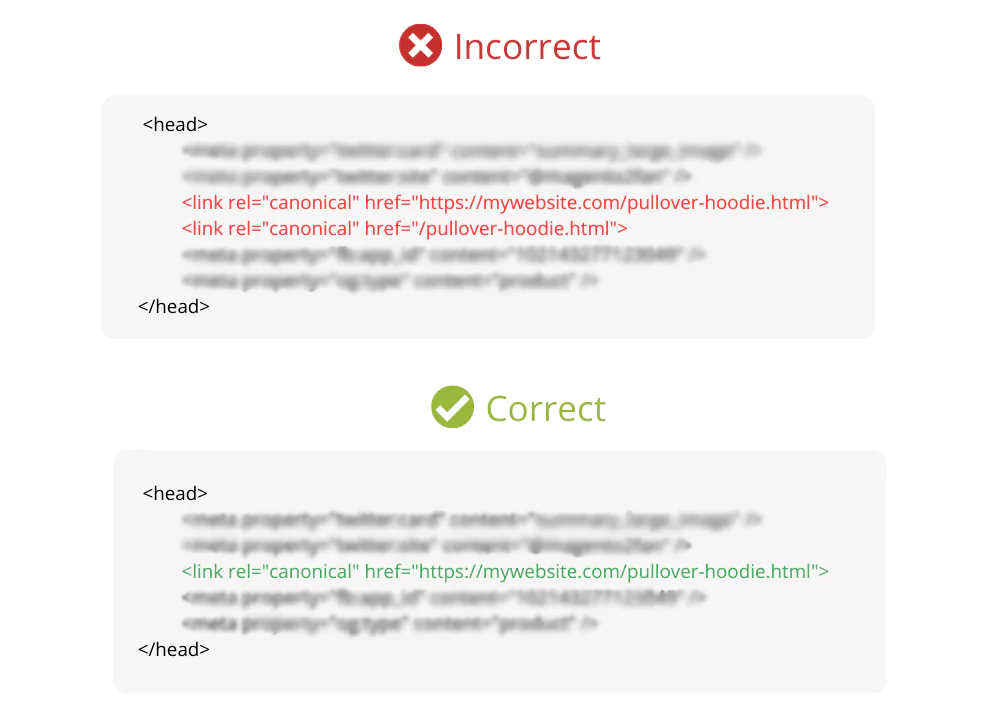
Next, you need to add a canonical tag in the <head> section of the duplicate pages. This tag tells search engines, ‘This is not the main page—look at the original one instead. please follow the original one instead. It looks like this: <link rel=”canonical” href=”https://www.example.com/main-page”/> — this tells Google which page is the original one
If you have pages that you don’t want people to land on directly, you can also use 301 redirects to automatically send visitors to the correct page. Don’t forget to check your internal links too – make sure they all point to the main version of the pages.
5. Best Practices to Avoid Canonical Issues
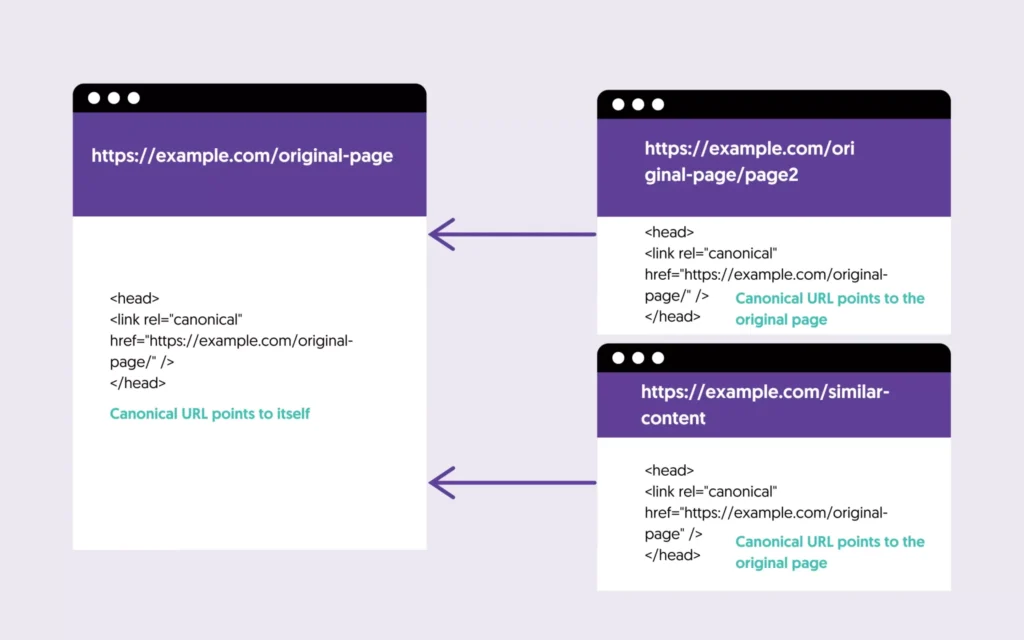
To avoid canonical issues, it’s important to keep your website content clean and well-organized. Pick one main page and use a main URL tag to tell Google which one to show in search results.. Make sure your site doesn’t show the same content on different URLs, like example.com/page and example.com/page? ref=abc. Always link to the original page tag version inside your website and avoid linking to duplicates. Following these simple habits can help keep your site strong, clean, and easy for search engines to understand and rank.
5.1 Avoid Duplicate Content
Try not to create a canonical issue; don’t copy the same content on different pages. If two pages are very similar, search engines might get confused. Write unique content for each page, and use a canonical tag to show which is the main one.
5.2 Use one URL Format Only
Choose one version of your website-either:
https://www.example.com
https://example.com
5.3 Set Up 301 Redirects
If a page is outdated or not needed, use a 301 redirect to guide visitors and Google to the right page
5.4 Keep Internal Links Clean
All links inside your website (like buttons, Menus, etc.) should point to the canonical version of each page. Avoid linking to pages that are the same or have extra tracking codes in the URL.
5.5 Avoid URL Parameters If Not Needed
Extra parameters like ?ref=abc and ?sort=price can make the same page look different. If you don’t have them, remove them. If needed, use a canonical tag to point to the main version.
5.6 Use SEO Tools To Check For Issues
Google Search Console
Yoast SEO plugins (WordPress)
Screaming frog
These tools can help you find duplicate pages and missing canonical tags.
5.7 Stay Consistent
Be consistent with your URL structure, linking, and canonical usage across your entire website. this helps Google understand your content better and improve your chances of ranking higher.
6. Conclusion
Canonical issues may seem like a small technical problem, but they can have a big impact on your SEO. When search engines get confused by duplicate and similar content, your URLs are clean, and by following simple best practices, you help search engines focus on the right version of your content. This makes your site more trustworthy, organized, and easier to rank higher on Google. So, take time to fix these issues – it’s a simple step that brings long-term SEO success.
Contact Us for More Information at KBDigitalFly.com
7. FAQs
Q1. What does “canonical issue” mean in SEO? It means the main or original version of a page that you want search engines to show.
Q2. Can I have multiple canonical tags on one page? No. Only use one main URL tag per page, or it may confuse Google.
Q3. Do canonical tags affect user experience? No, they are for search engines, not users. But they improve SEO, which helps users find your content easily.
Q4. Is it better to redirect or use a canonical tag? If the page must exist, use an original tag. If it’s not needed, do a 301 redirect.
Q5. What happens if we don’t add a canonical tag?
Google may get confused, and your page may not rank well.
Leave a comment